

Picking the best project management tool for your business
Using the right project management tool allows you to achieve more in your business. When you’re juggling all the balls, it can keep you organised, improve team collaboration, and improve your decision-making.
As a virtual assistant agency, we’ve seen the difference that having a suitable project management tool in place can make to an ambitious business leader like you. You’re able to create efficient workflows, work through tasks systematically, and save precious time.
But we also know that it’s a tricky decision to get right… and there’s an overwhelming range of tools available. That’s why we’re here to help you decide which tool is best for your needs. Plus, we’re sharing our tried-and-tested favourites.
What can a project management tool do?
Like most technology and systems, no two tools are the same. But from basic to advanced, you’ll likely find a mix of the following features in the project management tools available right now:
- Task management
- Collaboration and communication
- Project views (e.g., Kanban boards, Gantt charts, calendars)
- Automation and workflows
- Resource and time management (including time tracking)
- Reporting and analytics
- File and document sharing
- Integrations and app ecosystem
- Permissions and access control
- Mobile accessibility via a dedicated app
You can get standalone tools for project management or all-in-one platforms that also allow you to manage relationships and communication (a CRM system). Depending on your needs, you might choose to integrate two systems or pick a tool that does everything.
How to set up the best project management tool for your needs
It’s important to get the right tool for your needs from the start, so you’re not wasting time and energy setting up a system, getting used to using it, and onboarding team members, only to discover it’s not quite what you wanted.
Psst: We share our top 3 tools for keeping your projects organised below.
Here’s how you should approach choosing the right project management tool – and how a VA can support you in this process.
1. Assess the features
Although all project management tools offer different capabilities, it’s important to work out what you need from them.
For example, consider two scenarios:
- You want to organise your internal marketing campaign. Your team has 5 employees, all located in the same office, but only 2 need regular access to the tool.
- You want to track client projects and deliverables, plus your internal business development. You have a hybrid team of 15 individuals working remotely, all of which need regular access to the system.
For each of these situations, the needs are vastly different. What suits one company won’t necessarily suit the other.
From the list above, consider which features are essential for you. You can also work with a VA to decide which tool is best for your needs, as they will have experience using project management tools. At Virtually Priceless, our VAs access a wide range of tools, so understand the pros and cons of each.
If you’re unsure, it’s useful to look for case studies to better understand how a company uses the tool in their day-to-day work, plus learn how it’s benefited them.
For example, at Virtually Priceless, we supported Making Shift Happen to implement monday.com to support the rapidly growing company and provide a structure to keep projects and their team on track.
2. Consider subscriptions
Be careful not to be lured into a low-cost option that won’t be future-proof – consider how your team might grow in the future, too. Many project management tools offer free or affordable subscriptions for smaller teams but can become a big expense when you add more users or increase the capabilities.
3. Set up your project management tool
A project management tool is a brilliant way to streamline your workflow, stay organised, and collaborate with your team members. But they’re not always the easiest to set up and manage. This is where a VA will become a real asset to your company, as they can set up the tool for you, optimising the system fully and keeping records up to date.
Our top 3 project management tool recommendations
We’ve supported many of our clients with setting up tools to manage projects – either helping to set them up or maintaining existing systems. So we know a thing or two about which ones are easy to use and make a real impact on a team’s day-to-day operations.
Here are our favourite 3 project management tools (and why):
ClickUp
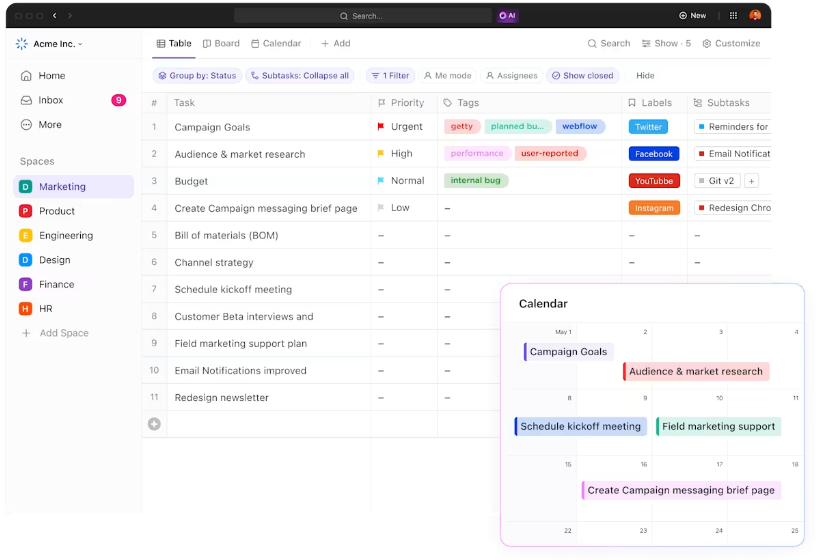
If you’re looking for a tool that gives you plenty of room for growth, ClickUp* is brilliant. This tool acts as an all-in-one platform to streamline your workflow – perfect for improving team collaboration on complex projects.
It’s best for teams looking for a versatile, customisable platform with multiple task visualisation options (List, Board, Gantt). Plus, you can use ClickUp as a full CRM system to manage customer pipelines, automate workflows, and stay on top of your marketing activity.
ClickUp also comes with a free-forever plan that offers enough features for some businesses, or you can upgrade to provide a full-service solution.
Monday.com
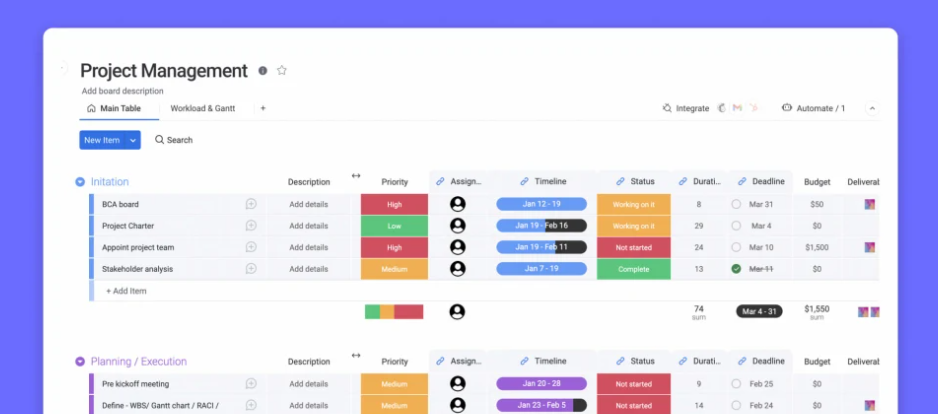
Another all-in-one project management tool that also offers robust CRM system features, monday.com is a great choice for teams looking for an easy-to-navigate, visual tool.
The colour-coded dashboards make it a dream to see what’s happening across team members and projects, all in one place. And you can integrate monday.com with many other third-party apps such as HubSpot.
Many of our clients love monday.com, including Making Shift Happen. We set this system up so they could stay on top of a surge in demand and open their capacity for more clients. Our VA also continued to support the client to adapt and offer ongoing admin and project management support while their business grew.
Trello
Most people seem to have heard of Trello now, and it’s popular for good reason. Trello is a really easy-to-use project management tool that allows you to view tasks in Kanban-style boards, using drag-and-drop cards.
Trello’s simple interface makes this perfect for visual thinkers who need a straightforward approach to task management. You can also easily collaborate with team members. But unlike monday.com or ClickUp, Trello doesn’t offer any CRM features.
Trello also offers a brilliant free plan, making it accessible to all businesses. Remember, don’t sign up for a paid subscription before you’ve assessed which features you’ll actually use.

Quick comparison: ClickUp vs. Monday.com vs. Trello
- ClickUp: Ideal for large teams with complex projects that need extensive customisation, advanced task dependencies, and a unified tool for both project management and communication.
- Monday.com: Great for small-to-medium-sized teams that want visual project tracking, pre-built templates, and robust collaboration tools with strong automations.
- Trello: Best for teams that prefer a lightweight approach to task and project management and need a simple, easy-to-use tool.
Get support implementing the right project management tool with Virtually Priceless
As you can see, using the right project management tool for your business needs will make a huge difference to your productivity and progress. We’d love to support you in that decision, taking the manual labour and onboarding off your hands so all you need to worry about is moving the needle in your business.
Get in touch and we’ll chat about how we can help you achieve your goals faster by getting you set up with an efficient project management tool.
*Please note, some of these are affiliate links, meaning if you click and make a purchase, we may receive a small reward. We only ever recommend tools that we use in our business, or have personally tried and tested.